$ cockpit watch
A change lives in four places at once. Cockpit is the join.
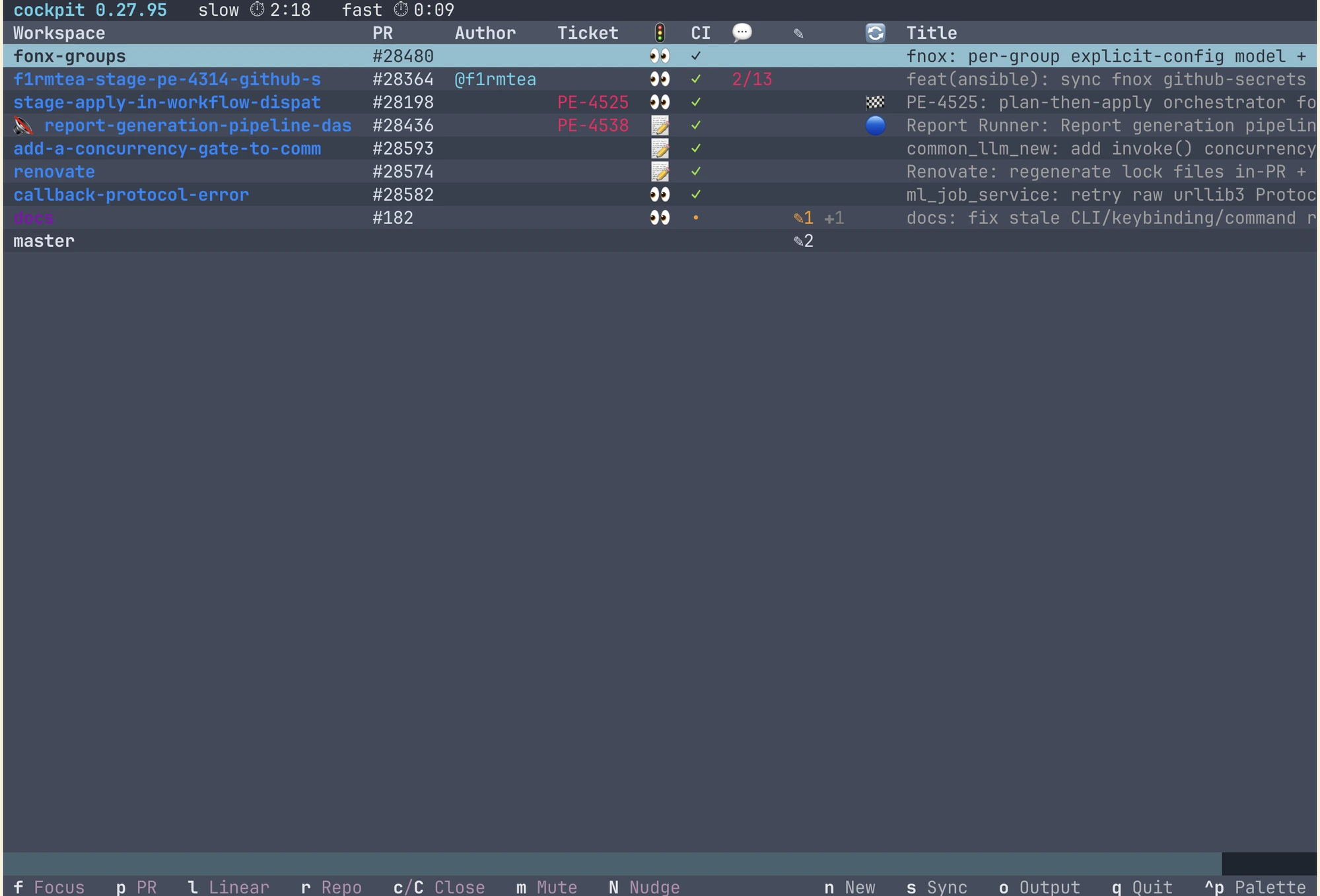
A git worktree, a GitHub PR, a ticket, and usually a Slack thread — one change, four places, and nothing joining them but you. Cockpit is that join: one row per change, showing all four live — CI, reviews, comments, dirty state, ticket status — and driven by keystroke.
$ cat WHY.md
It orchestrates context, not agents.
Cockpit doesn't plan work, split it up, or decide anything — you do that. What it takes off you is the clerical half of working on several things at once: which worktree that PR was cut from, which one is dirty, which review is waiting on you, which ticket nobody moved. The terminal in each worktree is running claude, but that's one more thing the row carries, not the thing being managed.
Every row is computed from the real state of git, GitHub, and your terminal backend each cycle — nothing is stored, so nothing drifts. From that one table you focus a session, open its PR or ticket, nudge an idle one, or close a finished worktree, without leaving the terminal.
what it does
One row per change
Worktree, terminal, PR, and ticket on a single line — re-derived every cycle from git worktree list, your terminal backend, and GitHub. Computed, not stored — with one deliberate exception: a ticket can move without anything in the PR changing, so ticket state is cached for up to fifteen minutes instead of refetched every cycle.
Works in both directions
Point cockpit new at any one of the four — a branch name, #42, PE-1234, a Slack permalink — and it materialises the rest, then reaps the whole row when the PR merges.
Ticket glue
Links each PR to Linear, Jira, GitHub Issues, or Trello via a footer in the PR body, and can transition the ticket on merge. One keystroke opens it.
Driven by keystroke
Most keys act on the highlighted row and the footer hints adapt to its state. Focus, nudge, close, or open a PR — no mouse, no leaving the terminal.
The full tour — every refusal, every gate, and what it deliberately doesn't do — is in FEATURES.md.
the verbs
- f
- Focus the row's workspace — spawns one first if it has none
- p
- Open the PR in a browser
- t
- Open the linked ticket (Linear / Jira / GitHub Issues / Trello)
- d
- Open the PR's diff in cmux's viewer
- a
- Ask — send a line to this row's session; on a repo header, to every session in it
- c / C
- Close worktree + workspace — refuses uncommitted or unpushed work; C overrides only the open-PR refusal
- m
- Mute / unmute the row's nudge — indefinite
- z
- Snooze / wake — silent until reviews change or new work lands
- n
- New workspace from a branch, PR, URL, ticket, or Slack thread
- h
- Park the row's repo — stop polling, close its idle workspaces
- s
- Sync — full reconcile now
- q
- Quit
- ^P
- Menu — logs, config, theme, and the feature guide
$ install
Three steps, brew or pipx.
requirements
Neither path installs the workspace backend — put cmux (macOS) or limux (Linux) on PATH yourself, plus Claude Code and an authenticated gh. Without a backend, the table and statusline still work; nothing can be spawned. The PyPI distribution is cmux-cockpit; the command stays cockpit.
cockpit setup can also install an optional statusline
Opt-in — prompted on first run; it installs cship + starship to render it.
and three in-session slash commands
It also drops /cockpit-new, /cockpit-close, and /cockpit-broadcast into ~/.claude/commands/ — thin wrappers over the matching cockpit CLI verbs. Spawn or tear down a worktree without leaving the session you're in, or push one line to every idle session at once — broadcast skips any that are mid-turn, waiting on a permission prompt, or parked. No plugin, no marketplace.
I use it every day to keep my own changes joined up — it's the platform behind the AI work on the rest of this site. Issues and PRs welcome.